Posted 3:31 p.m. Wednesday, June 10, 2026
Utilize this information to help you understand your paid time off
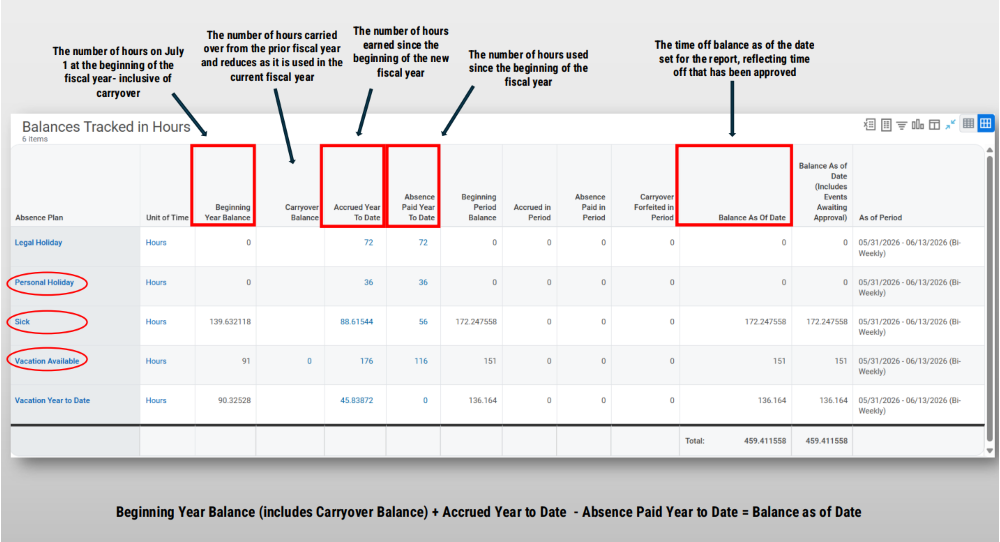
Expanding on the blog post from April 30, 2026, this post serves as an additional reminder and guide for employees to use their time off. The two categories of concern towards the end of each fiscal year are Vacation and Personal Holiday (see visuals here).
Understanding what happens to your time off is just as important as earning it. The Universities of Wisconsin’s Paid Leave Banks, and Vacation Cash Payouts Policy includes information regarding how unused time could be lost at the end of the fiscal year (June 30, 2026). The fiscal year starts every July 1 and ends on June 30.
Vacation
If you don’t use your Vacation hours in the fiscal year that you earn them, they will automatically carry over into the next fiscal year. However, you must then use those carryover hours by the end of the following fiscal year, or you’ll lose them. For example, automatic vacation carryover from the 2024-2025 fiscal year must be used by the end of the 2025-2026 fiscal year (June 30, 2026). Any unused vacation from the 2025-2026 fiscal year will carryover automatically to the 2026-2027 fiscal year.
If you have an available carryover balance from the prior fiscal year, it will be shown in your Workday Absence Balance table under “Carryover Balance”. If you request to use vacation time, it will pull from your Carryover Balance bank first.
Personal Holiday
Personal holiday time works differently. Employees receive a set amount of personal holiday hours each year. These hours must be used within the fiscal year (June 30). Personal holiday time is not carried over, banked, or paid out; it is forfeited if it remains unused. For example, all personal holiday hours in the current 2025-2026 fiscal year will be lost if not used by June 30, 2026.
The visual above shows a screen shot of the Workday Absence Balance table. These visuals provide small summaries of what each section of the leave table entails. To locate your own absence balances, navigate to the Absence Balance page using this Workday job aid. Be sure to log in and check your available balances before the end of the month (June 30, 2026).