



Quick guide for search and screen
A page within Human Resources
1. Purpose
This document is intended to be used as a quick reference tool and please refer to the Search and Screen Policy and Procedures KB for complete information. The process ensures fair, consistent, and compliant recruitment practices in alignment with university policies and Wisconsin Open Meeting Laws.
2. Scope
This process applies to all faculty and staff search committees responsible for reviewing applicants, conducting interviews, and recommending candidates for hire.
3. Roles and Responsibilities
| Role | Responsibilities |
| Search Committee Members | Complete required training, review applications, participate in interviews, and provide recommendations. |
| Committee Chair | Coordinate meetings, ensure compliance with open meeting laws, and communicate with HR and administration. |
| Civil Rights and Compliance (Aaron Cierzan, Sarah Jackson) | Provide guidance, approve candidate, and review finalist. |
| Director / Department Chair / Dean | Approve on-campus interviews, review finalists, and extend verbal offers (Dean). |
| Provost / Vice Chancellor | Provide final approval for hiring decisions. |
| HR / Talent Acquisition | Generate and route employment agreements, manage background checks, and finalize the hiring process. |
4. Prerequisites
Before participating in a search process, all committee members must complete the UWS - Equal Employment Opportunity: Ethical and Equitable Hiring that will be assigned by HR. If the training does not appear in your notifications or Workday Learning Home, please contact HRinfo@uwlax.edu.
5. Procedure
Step 1: Prepare Screening and Interview Materials
- Draft screening, interview, and reference questions.
- Submit these questions via email to:
- Aaron Cierzan
- Sarah Jackson
- Amy Hewitt
Step 2: Access Candidate Information
- In Workday, search for “Job Requisition Workspace.”
 Job Requisition Workspace
 - Select the recruitment(s) where you are listed as a committee member.
- Click the Candidates tab to view applicant lists.
Step 3: Conduct Committee Meetings
- Hold committee meetings to discuss candidate evaluations.
- Post all meeting dates and times to the Campus Events Calendar at least 24 hours prior to comply with open meeting laws.
- Include your agenda and, after the meeting, upload meeting minutes.
- Reference: HR Employee Resources – Conducting a Search and Screen Meeting
Step 4: Conduct Initial Candidate Review
- Review all candidates in the workspace.
- Identify and decline candidates who do not meet minimum qualifications, selecting the appropriate reason in Workday. This step can only be performed by the Search Chair.
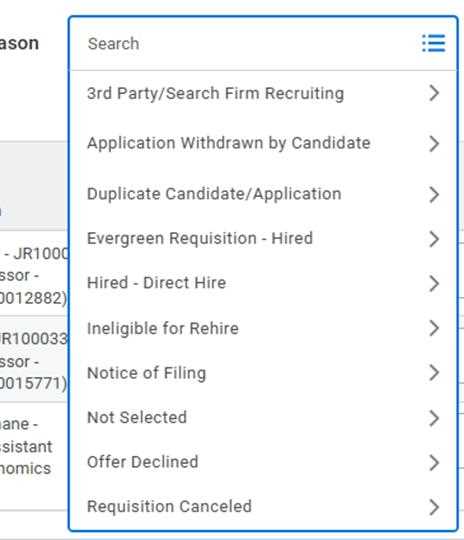 step 4
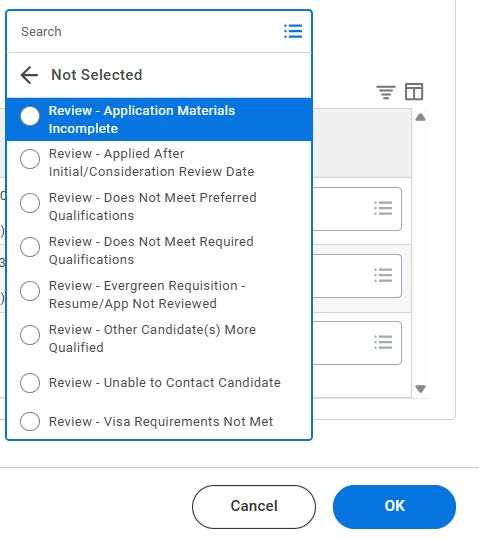 step4
step4
Step 5: Conduct Screening Interviews
- Select candidates for initial screening.
- Move them to Interview – 1st Interview status in Workday.
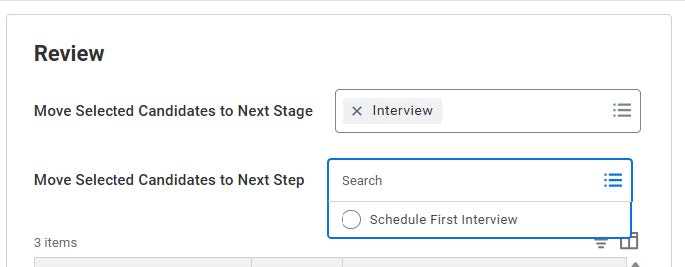 step 5
 step 5
 - Email candidates to schedule their first interview (phone, Zoom, or Teams).
Step 6: Request Approval for On-Campus Interviews
- After screening, determine which candidates to invite for on-campus interviews.
- Email your recommendations to:
- Department Chair
- Dean
- Aaron Cierzan
- Sarah Jackson
- Reference: HR Policy – Search and Screen Policy and Procedures
Step 7: Schedule and Conduct On-Campus Interviews
- Upon receiving approval, coordinate and schedule on-campus interviews.
- Conduct interviews following consistent and equitable evaluation practices.
Step 8: Perform Reference Checks
- Faculty reference checks are conducted by the committee.
- 3–5 references should be contacted, either before or after on-campus interviews.
- Non-Instructional Academic Staff reference checks should be submitted to hrinfo@uwlax.edu and are completed by HR.
Step 9: Recommend Finalist
- The committee meets to evaluate finalists.
- Present the recommended finalist to the Director/Dean, with the Department Chair, including a summary of each candidate’s strengths and weaknesses.
- The Director/Dean will seek Provost/Division Vice Chancellor approval for the final hiring decision.
Step 10: Offer and Employment Agreement – At this point please contact HR Recruitment for assistance in getting this completed.
- The Dean contacts the selected candidate with a verbal offer of employment.
- If the candidate accepts:
- The Dean notifies the Business Manager and Talent Acquisition Specialist by email.
- Include in the email:
- Start date
- Funding string
- Any required MOA
- Relocation or startup details
- Credit reduction (if applicable)
- All relevant contract details
Step 11: Contract and Background Checks
- HR generates the official employment agreement and routes it through Workday and email for review and approval.
- HR sends the finalized contract to the candidate along with:
- SkillSurvey misconduct check
- HireRight criminal background check
6. References and Resources
- HR Employee Resources – Conducting a Search and Screen Meeting
- HR Policy – Search and Screen Policy and Procedures
- Workday Learning: Uncovering Unconscious Bias in Recruiting and Interviewing