



WINGS
A page within WINGS
Welcome to WINGS!
WINGS is the name for UWL's Student Information System (SIS). The software provides students, faculty, and staff with access to information related to recruiting and admissions, records and registration, financial aid, student financials, and enhanced self-service capabilities. If you are experiencing issues when in WINGS, try using a different browser.
Students
- Change of Major (or Minor/Certificate)
- Submit an Intent to Graduate
- Final Exam Schedule for Student
- Your Transfer Credit Report
- Transcripts:
- Order an official transcript
- Retrieve an unofficial transcripts (current students only)
- Registration information is found further down.
Personal information
- Updating personal Info (Names, Address, Phone, etc)
- Privacy settings
- Restricting your directory information
- UWL's FERPA policy
- FERPA Secure PIN - If created for a guest, gives UWL permission to discuss student's educational record with that guest, with some limitations.
- FERPA Secure PIN Set Up - from Student WINGS manual
- FERPA Secure PIN - Knowledge Base article
Registration
- Registration Appointments
- Electronic Overrides (a.k.a. Permissions) FAQs
- Changing your schedule through the 10th day of the semester
Registering through Schedule Planner
- Searching for Classes & Creating a Schedule
- Create Favorite Schedules
- Validate Your Schedule
- Register Using Schedule Planner
Registering through WINGS
- Searching for Classes in WINGS
- Register Using WINGS
- Register Using a Permission Number (for collaborative students)
Waitlists & Swapping
- Get on a waitlist without swapping (don't need to drop another course)
- Swap onto a waitlist (another course will get dropped if you get in):
- Swapping without a waitlist (drops other course immediately):
- Find Current Position on the Waitlist - in WINGS
- Waitlist FAQs
Dropping a class
- View Academic Drop Deadlines for Courses
- Dropping Using Schedule Planner
- Dropping Using WINGS
- Dropping FAQs
More registration help
The schedule of classes for upcoming terms are available to the public on the Records' Registration page. The schedules are made available a semester at a time (including the intersession term).
- Registration steps for current and new students
- Registration Tips & Tricks
- Frequently Asked Questions - information about registration, diplomas, transcripts, enrollment verifications, and more
Advisement Report and advising
Miscellaneous
Login help
Current Students, Faculty, Staff:
- Password management and reset
- If unable to activate password, reset password, or you're experiencing other technical difficulties, contact the Eagle Help Desk
- 608.785.8774
- helpdesk@uwlax.edu
- Issues with Schedule Planner or WINGS registration can be directed to Records and Registration at 608.785.8951 or by email.
Applicants:
- After your application is received by the UWL Admissions Office, an email will be sent with your username and password information. You can then log into WINGS and monitor your admissions status. You will receive a UWL email after being admitted and formally matriculated.
- Prior to starting at UWL, questions about your student record and/or application should be directed to the Admissions Office at 608.785.8939 or by email.
- If you have not yet applied for admission to UW-La Crosse, visit the UW System electronic application to get started.
- If you are having technical difficulties logging in, please contact the Eagle Help Desk.
- 608.785.8774
- helpdesk@uwlax.edu
Former students:
Your UWL email and connected accounts are deleted after a full semester of non-enrollment. To see your record after leaving UWL, follow the directions on the transcript website to order a transcript. You may also contact Records and Registration at 608.785.8951 or email with questions.
Class Permissions
Student information
An override is permission from the instructor, department, or Deans Office that allows a student to add a course they normally can't. Specific restrictions may be overridden with permission such as the number of students allowed in the class (e.g. a closed class) and prerequisite requirements.
Students with questions about how overrides work may refer to:
- Override FAQs
- What to do if given a permission to add
- Contact their advisor or the Academic Advising Center
- Contact the Records and Registration office.
Faculty/Advisor directions
Overrides to get into a class and permissions to drop a class must be approved by the appropriate person as laid out in university policy. For adds, refer to the add/drop/change of schedule policy. For drops, refer to the individual class withdrawal policy. In lieu of electronic permission, paper forms can be picked up in the Records and Registration Office, 117 Graff Main Hall.
The "at least one override must be selected" message:
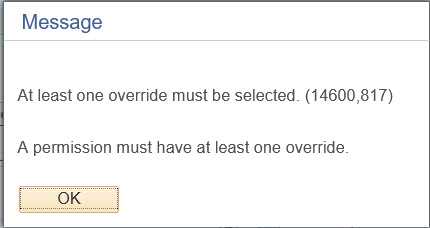 When you save the permission, you might receive a message that says "at least one override must be selected."
If you get this message when giving a drop permission, go out of the screen without saving and navigate to another part of WINGS. Then navigate back to and re-enter the permission. Save and wait until the system says "Saved" at the top right before continuing. If you click off the page before its done saving, WINGS won't save correctly. If this method doesn't work, please contact the Records Office.
If you get this message on the add permissions page, go to the Permissions tab and select at least one override on that page. Save.
Questions on how to use WINGS can be directed to Victoria Rahn in Records and Registration, vrahn@uwlax.edu or 785.8579.
Faculty, Advisors, Departments
New faculty and advising resources
Help documentation has been moved to a campus Teams site called WINGS for Advisors and Instructors. Click on the link. It should open up your Teams app. Then click "join." It may take a minute for the request to go through. You will then be able to find the site with the rest of your Teams in the app. Documents are on the "shared" tab. Additional related links are under the links tab.
Resources for department administration
Help documentation for departments was moved to a campus Teams site called "Records & Departments." Membership is limited to department administrators and related offices. If you are not currently a member, you may request access through Records & Registration.
UWL's academic scheduling policies and computer lab request form can be found on the Records & Registration's Academic Scheduling site.
Questions on WINGS help documents can be directed to Victoria Rahn in Records and Registration, vrahn@uwlax.edu or the Scheduling Team at recordssched@uwlax.edu.